
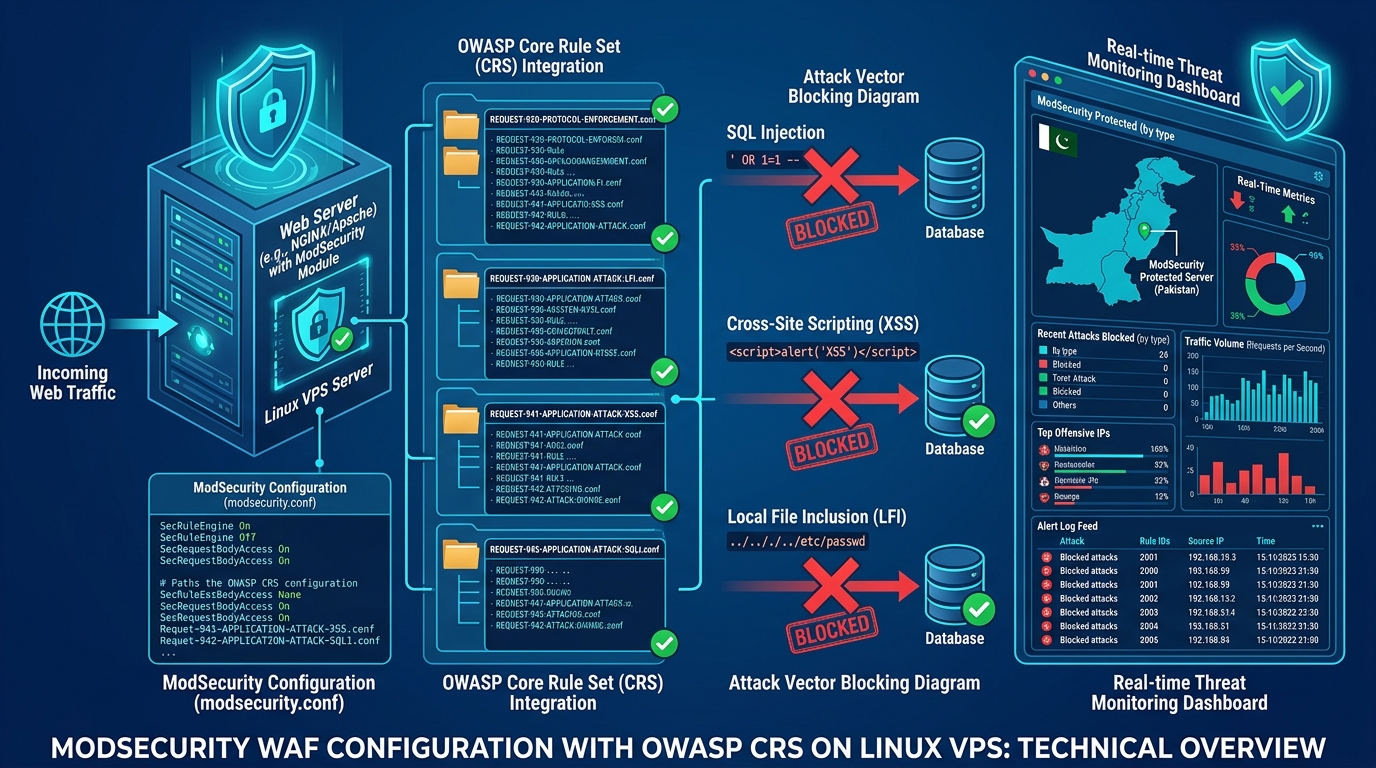
ModSecurity with the OWASP Core Rule Set (CRS) is the gold standard open-source Web Application Firewall, blocking SQL injection, XSS, Local File Inclusion, Remote Code Execution, and hundreds of other attack classes at the application layer — before they ever reach your PHP, Python, or Node.js application code.
On a self-managed Pakistan VPS, deploying ModSecurity transforms your web server from an exposed application endpoint into a hardened, enterprise-grade security perimeter — at zero additional cost beyond the initial configuration investment.
Architecture Overview
ModSecurity operates as a module inside your web server, intercepting every HTTP request and response:
Client Request
     ↓
[ModSecurity Request Phase]
  → Apply OWASP CRS rules
  → Score anomaly points
  → Block if score > threshold
     ↓
[Application / PHP / Python]
     ↓
[ModSecurity Response Phase]
  → Scan response for data leaks
  → Strip server version headers
     ↓
Client Response
The OWASP CRS v4 contains 200+ rules covering OWASP Top 10 attack classes, organized into numbered request files from REQUEST-901-INITIALIZATION.conf through REQUEST-980-CORRELATION.conf.
Step 1: Install ModSecurity v3 with NGINX
On Ubuntu 22.04/24.04 with NGINX:
# Install ModSecurity v3 connector
apt install -y libmodsecurity3 libmodsecurity-dev

# Install NGINX ModSecurity connector
apt install -y libnginx-mod-http-modsecurity

# Clone OWASP CRS v4
git clone https://github.com/coreruleset/coreruleset.git /etc/nginx/modsecurity/crs
cp /etc/nginx/modsecurity/crs/crs-setup.conf.example /etc/nginx/modsecurity/crs/crs-setup.conf
Create the main ModSecurity configuration:
cat > /etc/nginx/modsecurity/modsecurity.conf << 'EOF'
# Enable ModSecurity engine
SecRuleEngine On

# Request body handling
SecRequestBodyAccess On
SecRequestBodyLimit 13107200
SecRequestBodyNoFilesLimit 131072

# Response body handling
SecResponseBodyAccess On
SecResponseBodyMimeType text/plain text/html application/json
SecResponseBodyLimit 524288

# Logging
SecAuditEngine RelevantOnly
SecAuditLog /var/log/nginx/modsec_audit.log
SecAuditLogParts ABIJDEFHZ
SecAuditLogType Serial

# Default action: block with 403
SecDefaultAction "phase:1,log,auditlog,deny,status:403"

# Include OWASP CRS
Include /etc/nginx/modsecurity/crs/crs-setup.conf
Include /etc/nginx/modsecurity/crs/rules/*.conf
EOF
Enable in NGINX configuration:
# /etc/nginx/nginx.conf (http block)
modsecurity on;
modsecurity_rules_file /etc/nginx/modsecurity/modsecurity.conf;
Step 2: Start in Detection Mode First
Never deploy ModSecurity in blocking mode on a production site without a detection phase. Start with SecRuleEngine DetectionOnly to identify false positives:
sed -i 's/SecRuleEngine On/SecRuleEngine DetectionOnly/' /etc/nginx/modsecurity/modsecurity.conf
nginx -t && systemctl reload nginx
Monitor for triggered rules over 48–72 hours:
# Count rule hits by ID
grep "id \"" /var/log/nginx/modsec_audit.log | \
  grep -oP 'id "\K[0-9]+' | sort | uniq -c | sort -rn | head -20
Rules firing frequently on legitimate traffic are false positives requiring exclusions before switching to blocking mode.
Step 3: Paranoia Level Tuning
The OWASP CRS supports four paranoia levels in crs-setup.conf:
# crs-setup.conf
# PL1 (default): Reasonable FP rate, blocks obvious attacks
# PL2: More aggressive, some FPs on complex apps
# PL3: High security, significant FPs on dynamic apps
# PL4: Maximum security, only for static/API endpoints

SecAction \
  "id:900000,\
  phase:1,\
  pass,\
  t:none,\
  nolog,\
  tag:'OWASP_CRS',\
  ver:'OWASP_CRS/4.0.0',\
  setvar:tx.blocking_paranoia_level=2,\
  setvar:tx.detection_paranoia_level=3"
For most WordPress and PHP applications on Pakistan VPS hosting, Paranoia Level 2 with an anomaly threshold of 10 is the optimal balance.
Step 4: Eliminating False Positives
Common false positives occur with WordPress admin, WooCommerce checkout, and contact forms. Add surgical exclusions:
# Exclude WordPress admin from body scanning (legitimate complex requests)
SecRule REQUEST_URI "@beginsWith /wp-admin" \
  "id:9000,\
  phase:1,\
  pass,\
  nolog,\
  ctl:ruleRemoveById=200002,\
  ctl:ruleRemoveById=200003"

# Exclude WooCommerce checkout POST
SecRule REQUEST_URI "@streq /checkout/" \
  "id:9001,\
  phase:1,\
  pass,\
  nolog,\
  ctl:ruleRemoveByTag=attack-sqli,\
  ctl:requestBodyProcessor=URLENCODED"

# Whitelist trusted IPs (your office / development IP)
SecRule REMOTE_ADDR "@ipMatch 203.128.0.0/24" \
  "id:9002,\
  phase:1,\
  pass,\
  nolog,\
  ctl:ruleEngine=Off"
Step 5: Custom Rules for Pakistan-Specific Threats
Add targeted rules for common attack patterns against Pakistani hosting infrastructure:
# Block common vulnerability scanners
SecRule REQUEST_HEADERS:User-Agent "@pmFromFile /etc/nginx/modsecurity/bad-bots.txt" \
  "id:9100,\
  phase:1,\
  deny,\
  status:403,\
  log,\
  msg:'Blocked vulnerability scanner'"

# Block xmlrpc.php brute force (WordPress)
SecRule REQUEST_URI "@streq /xmlrpc.php" \
  "id:9101,\
  phase:1,\
  chain,\
  deny,\
  status:403,\
  log,\
  msg:'xmlrpc.php blocked'"
  SecRule REQUEST_METHOD "!@streq GET"

# Rate limit login attempts
SecRule REQUEST_URI "@streq /wp-login.php" \
  "id:9102,\
  phase:1,\
  pass,\
  initcol:ip=%{REMOTE_ADDR},\
  setvar:ip.login_attempts=+1,\
  expirevar:ip.login_attempts=300"

SecRule IP:LOGIN_ATTEMPTS "@gt 10" \
  "id:9103,\
  phase:1,\
  deny,\
  status:429,\
  log,\
  msg:'Login rate limit exceeded'"
Step 6: Switch to Blocking Mode
After confirming no legitimate traffic is being blocked in detection mode:
sed -i 's/SecRuleEngine DetectionOnly/SecRuleEngine On/' /etc/nginx/modsecurity/modsecurity.conf
nginx -t && systemctl reload nginx
Verify blocking is active:
# Test SQL injection blocking
curl -i "https://yourdomain.pk/?id=1+OR+1=1"
# Should return: HTTP/1.1 403 Forbidden

# Test XSS blocking
curl -i "https://yourdomain.pk/?search=<script>alert(1)</script>"
# Should return: HTTP/1.1 403 Forbidden
Monitoring and Alerting
Set up real-time ModSecurity alerting via log monitoring. This pairs directly with the NGINX performance tuning and MySQL database hardening layers for a fully secured, high-performance LEMP stack:
# Install GoAccess for real-time log visualization
apt install -y goaccess

# Parse ModSecurity audit log in real-time
tail -f /var/log/nginx/modsec_audit.log | grep "id \"9" | \
  awk '{print $1, $2, "BLOCKED:", $NF}'
ModSecurity on a Pakistan VPS provides enterprise WAF protection at zero licensing cost — the same protection charged at $500–2,000/month by commercial WAF vendors — making it the definitive security upgrade for any self-managed web hosting environment.
