
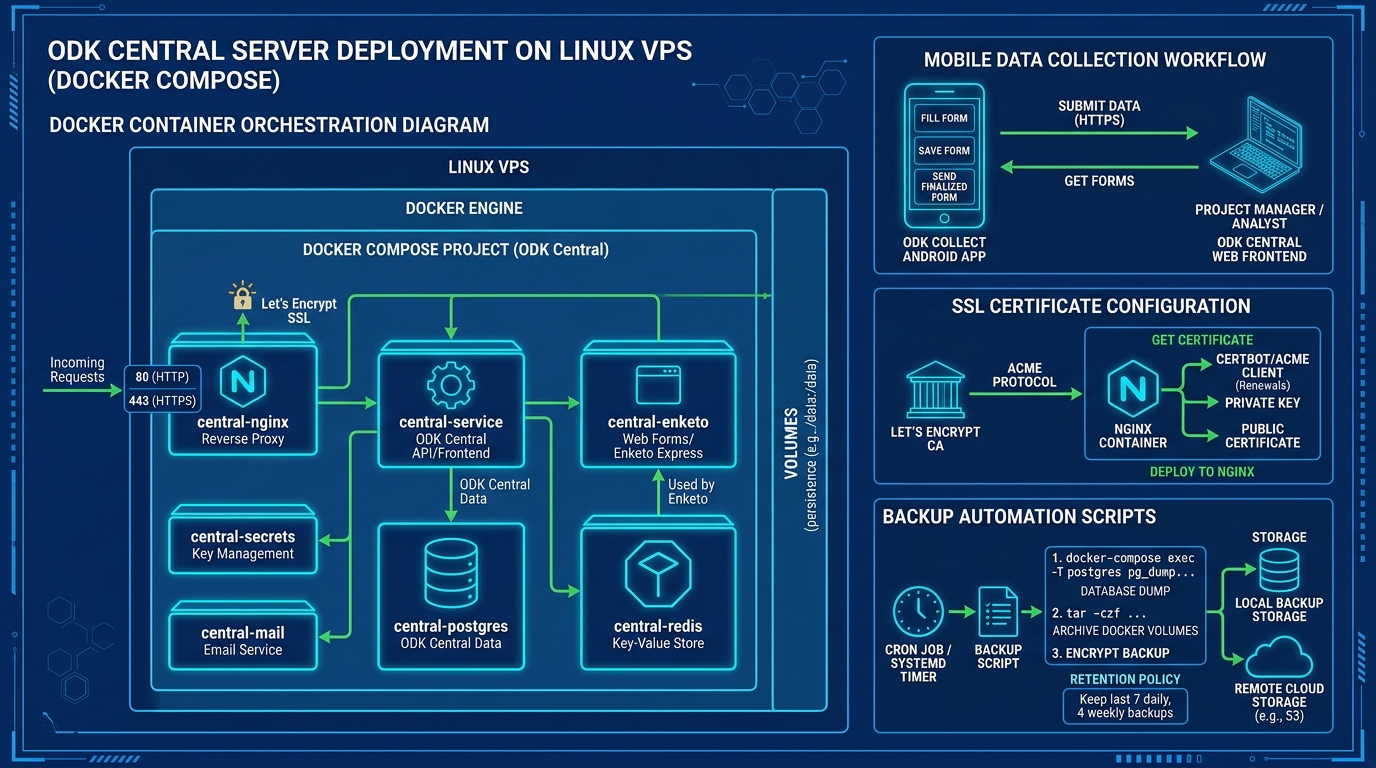
ODK Central is the official server platform for the Open Data Kit ecosystem — used by UNICEF, WHO, World Bank, and hundreds of NGOs across Pakistan for mobile field data collection, survey management, and real-time submission processing. Unlike the deprecated ODK Aggregate, Central provides a modern RESTful API, granular project-based access control, encrypted form submissions, and native Enketo web form support.
Self-hosting ODK Central on a Pakistan VPS gives organizations full control over their survey data — critical for projects handling sensitive beneficiary information under Pakistani data protection regulations — while eliminating the recurring costs of managed ODK hosting services.
Architecture Overview
ODK Central runs as a multi-container Docker Compose application with six interconnected services:
┌─────────────────────────────────────────────┐
│                 Docker Engine                │
│                                             │
│  ┌──────────┐  ┌──────────┐  ┌──────────┐  │
│  │  NGINX   │──│ Central  │──│ Enketo   │  │
│  │ (Proxy)  │  │ (API)    │  │ (Forms)  │  │
│  └──────────┘  └──────────┘  └──────────┘  │
│       │              │              │       │
│  ┌──────────┐  ┌──────────┐  ┌──────────┐  │
│  │  Mail    │  │PostgreSQL│  │  Redis   │  │
│  │ (SMTP)   │  │ (Data)   │  │ (Cache)  │  │
│  └──────────┘  └──────────┘  └──────────┘  │
└─────────────────────────────────────────────┘
Each service runs in its own isolated container with persistent Docker volumes for data durability.
Prerequisites
Before starting, ensure your VPS meets these minimum requirements:
| Resource | Minimum | Recommended |
|---|---|---|
| RAM | 2 GB | 4 GB |
| CPU | 1 vCPU | 2 vCPU |
| Storage | 20 GB SSD | 50 GB NVMe |
| OS | Ubuntu 22.04 / Debian 12 | Ubuntu 24.04 LTS |
| Ports | 80, 443 open | 80, 443 open |
Step 1: Install Docker and Docker Compose
# Update system packages
sudo apt update && sudo apt upgrade -y

# Install Docker via official script
curl -fsSL https://get.docker.com | sh

# Add your user to the docker group
sudo usermod -aG docker $USER

# Install Docker Compose plugin
sudo apt install docker-compose-plugin -y

# Verify installation
docker --version
docker compose version
Log out and back in for the group change to take effect.
Step 2: Clone ODK Central Repository
# Clone the official ODK Central repository
git clone https://github.com/getodk/central.git /opt/odk-central
cd /opt/odk-central

# Initialize submodules (Enketo, etc.)
git submodule update --init --recursive
Step 3: Configure Environment Variables
Copy the sample environment file and customize it:
cp .env.template .env
nano .env
Critical settings to configure:
# Your domain name (must have DNS A record pointing to this server)
DOMAIN=odk.yourdomain.pk

# SSL via Let's Encrypt
SSL_TYPE=letsencrypt
[email protected]

# Database password (generate a strong random password)
POSTGRES_PASSWORD=$(openssl rand -base64 32)

# HTTP port bindings
HTTP_PORT=80
HTTPS_PORT=443
Step 4: Launch ODK Central
cd /opt/odk-central
docker compose build
docker compose up -d
Monitor startup logs to ensure all services initialize correctly:
# Watch container health
docker compose ps

# Check Central API logs
docker compose logs -f service

# Verify all containers are "healthy"
docker compose ps --format "table {{.Name}}\t{{.Status}}"
Initial startup takes 2–5 minutes as PostgreSQL initializes the database schema and Enketo compiles form templates.
Step 5: Create Your First Admin Account
docker compose exec service odk-cmd --email [email protected] user-create
docker compose exec service odk-cmd --email [email protected] user-promote
Navigate to https://odk.yourdomain.pk and log in with your admin credentials.
Step 6: SSL Certificate Configuration
If you chose SSL_TYPE=letsencrypt, certificates are provisioned automatically on first boot. To verify:
# Check certificate status
docker compose exec nginx certbot certificates

# Force renewal (if needed)
docker compose exec nginx certbot renew --force-renewal
For custom certificates (organizational CA), replace the certificate files in the files/local/customssl/ directory and set SSL_TYPE=customssl in .env. This is similar to the SSL hardening techniques used for production web servers.
Step 7: Automated Backup Script
Data loss on an ODK Central server can mean losing months of field survey data. Set up automated daily backups:
cat > /opt/odk-central/backup.sh << 'BACKUP'
#!/bin/bash
BACKUP_DIR="/opt/odk-backups"
TIMESTAMP=$(date +%Y%m%d_%H%M%S)
mkdir -p $BACKUP_DIR

# Dump PostgreSQL database
docker compose -f /opt/odk-central/docker-compose.yml exec -T postgres \
  pg_dump -U odk -d odk > "$BACKUP_DIR/odk_db_$TIMESTAMP.sql"

# Archive Docker volumes
tar -czf "$BACKUP_DIR/odk_volumes_$TIMESTAMP.tar.gz" \
  /var/lib/docker/volumes/central_transfer_* \
  /var/lib/docker/volumes/central_config_*

# Encrypt backup
gpg --symmetric --cipher-algo AES256 \
  --output "$BACKUP_DIR/odk_backup_$TIMESTAMP.tar.gz.gpg" \
  "$BACKUP_DIR/odk_volumes_$TIMESTAMP.tar.gz"

# Cleanup unencrypted files
rm -f "$BACKUP_DIR/odk_volumes_$TIMESTAMP.tar.gz"

# Retention: keep last 7 daily backups
find $BACKUP_DIR -name "*.sql" -mtime +7 -delete
find $BACKUP_DIR -name "*.gpg" -mtime +7 -delete

echo "[$(date)] ODK Central backup completed: $BACKUP_DIR"
BACKUP

chmod +x /opt/odk-central/backup.sh
Schedule the backup via cron:
# Run daily at 2:00 AM PKT
echo "0 2 * * * /opt/odk-central/backup.sh >> /var/log/odk-backup.log 2>&1" | crontab -
Step 8: Performance Tuning for High-Volume Deployments
For large-scale surveys (10,000+ submissions/day), tune PostgreSQL within the Docker container:
# Edit PostgreSQL configuration
docker compose exec postgres bash -c "cat >> /var/lib/postgresql/data/postgresql.conf << EOF
shared_buffers = 512MB
work_mem = 16MB
maintenance_work_mem = 128MB
effective_cache_size = 1536MB
max_connections = 200
EOF"

# Restart PostgreSQL container
docker compose restart postgres
These settings align with the MySQL/MariaDB performance tuning principles — allocating 25% of server RAM to shared buffers and sizing the effective cache to 75% of available memory.
Connecting ODK Collect Mobile App
On your field workers’ Android devices:
- Open ODK Collect → Settings → Server.
- Set URL to
https://odk.yourdomain.pk. - Enter the username/password created in Central.
- Tap “Get Blank Form” to download survey forms.
All form submissions are encrypted in transit (HTTPS) and can be end-to-end encrypted at rest using ODK Central’s built-in encryption key management.
Self-hosting ODK Central on a Pakistan VPS provides NGOs, research institutions, and government agencies with a sovereign, compliant, and cost-effective survey data infrastructure — eliminating dependency on international SaaS providers while maintaining full control over sensitive field data.
