
Over 30,000 websites are hacked every single day. The vast majority of these security incidents are not bespoke targeted attacks conducted by sophisticated nation-state actors; they are automated scripts and botnets scanning the public internet for unpatched CMS plugins, misconfigured file permissions, and default administrative credentials.
A single compromised website can result in blacklisting by Google Safe Browsing, leaked customer records, severe regulatory penalties under data protection laws, and irreversible brand damage.
Website security is not a one-time plugin installation—it is a continuous defense-in-depth posture. Here are 8 practical, highly effective methods to fortify your web infrastructure in 2026.
1. Enforce Modern TLS 1.3 Encryption and HSTS Headers
Standard HTTPS certificates encrypt traffic between your visitors and the web server, protecting sensitive data (such as login credentials and credit card information) from man-in-the-middle (MITM) packet sniffing.
To prevent SSL stripping attacks, enforce HTTP Strict Transport Security (HSTS):
# Nginx HSTS & Security Headers Configuration
add_header Strict-Transport-Security "max-age=31536000; includeSubDomains; preload" always;
add_header X-Content-Type-Options "nosniff" always;
add_header X-Frame-Options "SAMEORIGIN" always;
add_header Referrer-Policy "strict-origin-when-cross-origin" always;
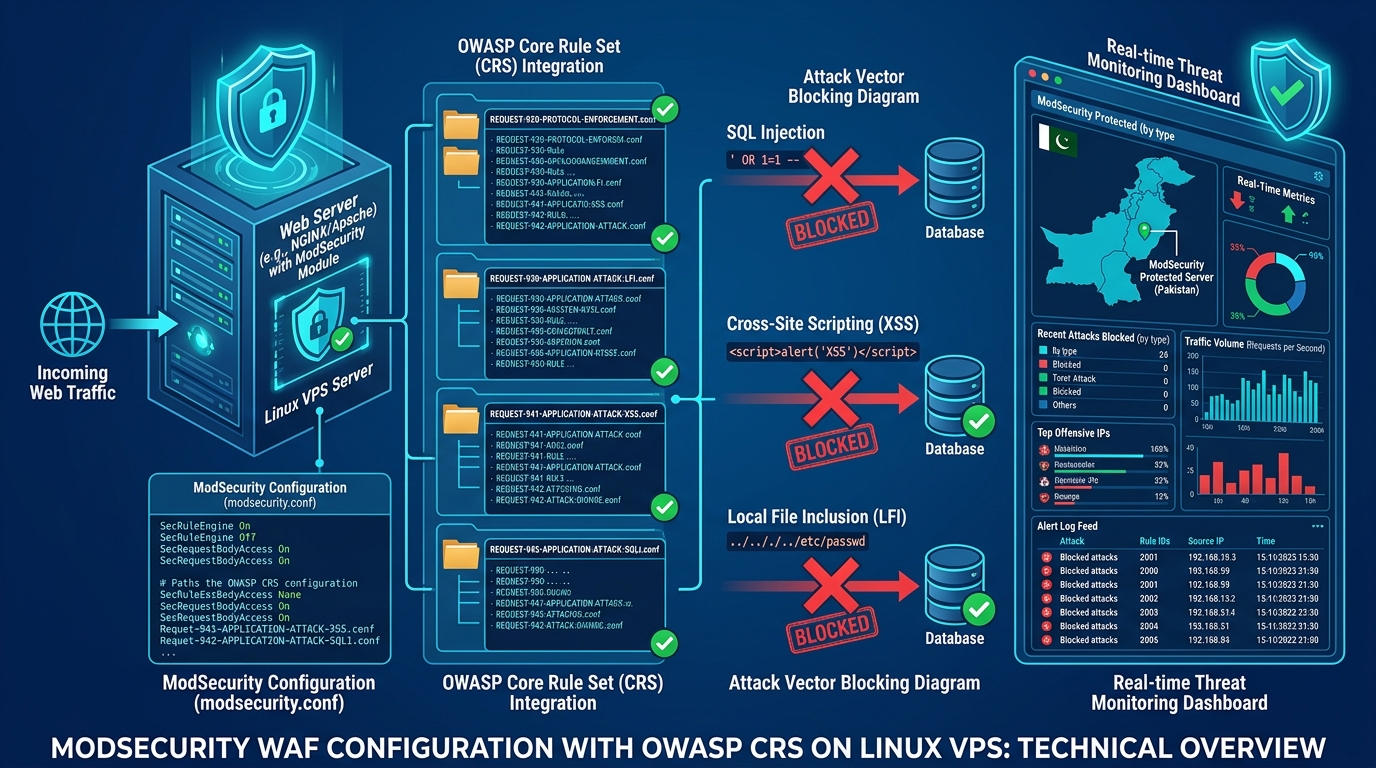
2. Deploy a Web Application Firewall (WAF) with OWASP Core Rules
A Web Application Firewall sits in front of your web application, inspecting HTTP/HTTPS traffic for malicious payloads before they ever reach your application code.
A configured WAF filters out:
- SQL Injection (SQLi) attempts targeting your database.
- Cross-Site Scripting (XSS) vectors designed to steal session cookies.
- Remote Code Execution (RCE) payloads targeting known plugin vulnerabilities.
- Automated bot crawlers attempting dictionary brute-force attacks against
/wp-login.phpor/admin.
3. Disable Password-Based SSH Login and Change Default Ports
If your server allows SSH password authentication, brute-force bots will bombard port 22 with millions of automated attempts daily.
Harden your server by switching to cryptographic Ed25519 SSH key pairs and disabling root password access:
# /etc/ssh/sshd_config
Port 2222
PermitRootLogin prohibit-password
PasswordAuthentication no
ChallengeResponseAuthentication no
PubkeyAuthentication yes
After modifying the configuration, reload the SSH daemon:
sudo systemctl reload sshd4. Enforce Strict Linux File and Directory Permissions
Improper file permissions are one of the most common vectors malicious actors use to upload web shells and malicious PHP backdoors into public directories.
Ensure that web server processes (www-data or nobody) cannot arbitrarily write to your executable application code:
- Standard Directories:
chmod 755(Read/Write/Execute for owner, Read/Execute for others). - Application Files:
chmod 644(Read/Write for owner, Read-only for others). - Sensitive Config Files (
wp-config.php,.env):chmod 600orchmod 400so only the process owner can view database credentials.
5. Mandate Multi-Factor Authentication (MFA) Across All Portals
Password reuse across multiple online services makes standard single-factor authentication dangerously vulnerable to credential stuffing attacks.
Enforce Multi-Factor Authentication (MFA / 2FA) using hardware security keys (FIDO2/WebAuthn) or time-based one-time password (TOTP) authenticator apps (Google Authenticator, Bitwarden) across:
- CMS administrative panels (WordPress, Magento, Drupal).
- Web hosting control panels (cPanel, DirectAdmin, CyberPanel).
- Domain registrar accounts and DNS management dashboards.
6. Sanitize User Inputs and Enforce Parameterized SQL Queries
Never concatenate raw user input directly into SQL queries or HTML output. Unsanitized inputs open direct pathways for SQL injections that can dump your entire database in seconds.
Always use prepared statements and parameterized queries in your backend codebase:
// Secure Prepared Statement with PDO
$stmt = $pdo->prepare('SELECT id, email, role FROM users WHERE email = :email AND status = :status');
$stmt->execute(['email' => $userEmail, 'status' => 'active']);
$user = $stmt->fetch();
7. Implement Automated 3-2-1 Offsite Backups
Even with top-tier defensive measures, having an isolated, verified backup is your ultimate safety net against zero-day vulnerabilities, accidental deletions, or ransomware.
Follow the 3-2-1 backup principle:
- 3 Copies: One primary production copy and two distinct backup copies.
- 2 Different Formats/Locations: Local snapshots on the server and remote object storage (Amazon S3, Wasabi, or Cloudflare R2).
- 1 Offsite Air-Gapped Copy: Stored in a separate geographical region with strict write-once, read-many (WORM) immutability policies.
8. Migrate Away from Vulnerable, Overcrowded Shared Hosting
On budget shared hosting environments, dozens—sometimes hundreds—of unrelated websites share the exact same kernel, web server, and file system. If another account on your shared node is compromised, attackers can often perform local privilege escalation to read configuration files across neighboring accounts.
For enterprise e-commerce portals, fintech applications, and critical corporate databases, complete physical isolation is non-negotiable:
- Upgrade to bare-metal Dedicated Servers to achieve 100% dedicated hardware isolation, private VLAN networking, and custom kernel security patches.
- Pakistani enterprises handling financial data or adhering to local SBP/SECP regulations should host on Dedicated Servers in Pakistan for domestic data residency, hardware RAID arrays, and dedicated 1Gbps uplink capacity.
Secure Your Online Assets with Nextgen Hosting
Protect your web applications with enterprise WAF protection, automated daily backups, free SSL certificates, and 24/7 proactive security monitoring.
