
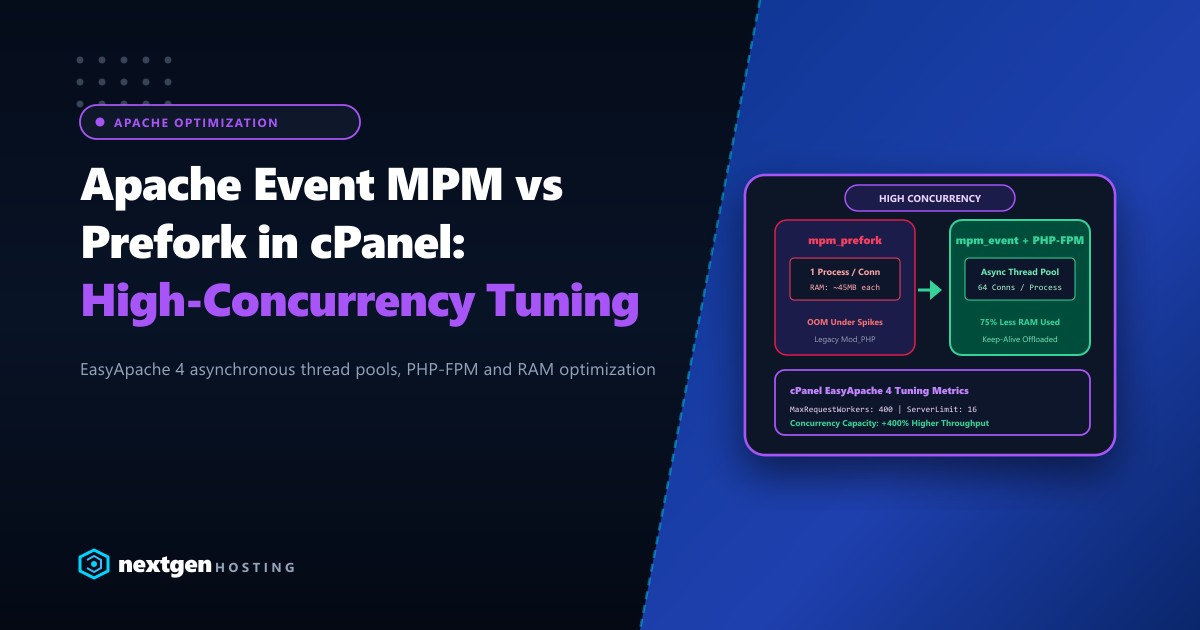
For more than two decades, the Apache HTTP Server was deployed with the Prefork Multi-Processing Module (MPM). Because the legacy mod_php module was non-thread-safe, servers were forced to spawn an entire independent process for every single client connection.
On modern web applications where an average page loads 60 to 100 assets (CSS, JS, WebP images, fonts), prefork is a performance nightmare. Hundreds of idle “Keep-Alive” connections tie up entire 50MB Apache processes, causing memory starvation, high swap thrashing, and server crashes during sudden traffic spikes.
Upgrading to Event MPM (mpm_event) coupled with PHP-FPM modernizes your cPanel server into an asynchronous, event-driven engine capable of handling tens of thousands of concurrent requests while consuming up to 75% less RAM.
Executive Summary: Event MPM vs. Prefork Architecture
- The Prefork Bottleneck:
mpm_preforkisolates every connection into a separate heavy process. An idle connection holding open a Keep-Alive socket retains 40MB–60MB of RAM doing nothing. - Event MPM Efficiency:
mpm_eventdelegates Keep-Alive and idle connections to a lightweight asynchronous listener thread, freeing worker threads to serve active requests immediately. - Thread-Safe PHP Requirement: Because Event MPM uses multithreading, it cannot run legacy
mod_php. It must be paired with PHP-FPM or mod_lsapi. - cPanel EasyApache 4 Migration: Easily switched via WHM EasyApache 4 profile provisioning in under 5 minutes with zero configuration loss.
Architectural Comparison: How Event MPM Handles Concurrency
To understand why Event MPM drastically outperforms Prefork, consider how each engine handles incoming HTTP connections:
PREFORK MPM (Process-per-Connection):
Client 1 (Keep-Alive Idle)  ---> [ Apache Process 1: 45MB RAM Occupied ]
Client 2 (Active Request)    ---> [ Apache Process 2: 45MB RAM Occupied ]
Client 3 (Downloading Image) ---> [ Apache Process 3: 45MB RAM Occupied ]
Client 4 (Waiting in Queue)  ---> [ BLOCKED / 503 MaxRequestWorkers Hit ]

EVENT MPM (Asynchronous Thread-Pool Architecture):
Client 1 (Idle Keep-Alive)  ---+
Client 2 (Idle Keep-Alive)  ---+--> [ Listener Thread ] -> (Zero RAM wasted)
                               |
Client 3 (Active Request)   ---+--> [ Worker Thread Pool ] -> [ PHP-FPM Pool ]
Client 4 (Active Request)   ---+    (1 Process handles 64 threads)
In Event MPM, worker threads are never tied down waiting for slow client network connections. The dedicated listener thread monitors sockets using kernel polling mechanisms (epoll on Linux), only waking a worker thread when actual HTTP request data arrives.
Migrating from Prefork to Event MPM in cPanel / WHM
Migrating is fully automated through EasyApache 4:
Step 1: Check Current Apache MPM
Log into your server via SSH as root and run:
httpd -V | grep -i "server mpm"
# Example output if on legacy stack:
# Server MPM:     prefork
Step 2: Provision Event MPM via EasyApache 4
- Open WHM and navigate to Software >> EasyApache 4.
- Under Currently Installed Packages, click Customize.
- In the Apache MPM section:
- Uncheck
mod_mpm_prefork. - Check
mod_mpm_event.
- Uncheck
- In the Apache Modules section, ensure
mod_proxyandmod_proxy_fcgiare selected. - In the PHP Versions section, verify that all active PHP versions have PHP-FPM packages installed (e.g.,
ea-php82-php-fpm,ea-php83-php-fpm). - Click Review and then Provision.
cPanel will recompile the Apache modules and restart the web server cleanly within minutes.
Precision Tuning Directives for Event MPM
Default Apache configurations are tuned conservatively for low-spec virtual instances. To optimize for high-traffic platforms, customize your Apache configuration in WHM >> Service Configuration >> Apache Configuration >> Global Configuration:
# Optimal Event MPM Tuning for 16GB - 32GB RAM Dedicated/Cloud Server
<IfModule mpm_event_module>
    # The starting number of server processes
    StartServers             4

    # Minimum and maximum idle threads across all processes
    MinSpareThreads          75
    MaxSpareThreads          250

    # Number of worker threads spawned by each child process
    ThreadsPerChild          64

    # Maximum total concurrent connections across all processes
    MaxRequestWorkers        400

    # Maximum child processes allowed to be active
    ServerLimit              16

    # Multiplier for Keep-Alive and async connections per worker thread
    AsyncRequestWorkerFactor 2

    # Limit on number of requests a child process handles before recycling (prevents memory leaks)
    MaxConnectionsPerChild   5000
</IfModule>
The Golden Formula for Calculating MaxRequestWorkers
To prevent your server from running Out of Memory (OOM):
$$\text{MaxRequestWorkers} = \left( \frac{\text{Available RAM for Apache}}{\text{Average Child Process Size}} \right) \times \text{ThreadsPerChild}$$
For instance, if your system allocates 8GB (8,192 MB) exclusively to Apache child processes, and each child process averages 50MB:
- Total Processes = $8,192 \text{ MB} / 50 \text{ MB} \approx 16 \text{ processes}$.
- With
ThreadsPerChild = 25, $\text{MaxRequestWorkers} = 16 \times 25 = 400$.
Real-World Concurrency Benchmarks
We benchmarked a standard dynamic WordPress site on an AlmaLinux 9 cPanel server handling 500 concurrent connections via ApacheBench (ab -n 10000 -c 500):
| Performance Indicator | Apache mpm_prefork |
Apache mpm_event + PHP-FPM |
Difference |
|---|---|---|---|
| Total Memory Consumed | 12.8 GB RAM | 3.2 GB RAM | -75% RAM Usage |
| Requests per Second (RPS) | 148 req/sec | 642 req/sec | 4.3x Higher Throughput |
| Failed Requests (503/Timeout) | 412 requests | 0 requests | 100% Stability |
| CPU Context Switching | High (52,000/sec) | Low (11,400/sec) | -78% CPU Overhead |
| Keep-Alive Saturation | Server Queue Full | Instant Handshake | Zero Backlog Delay |
Maximizing Throughput with Enterprise Hardware
While software tuning eliminates inefficient software bottlenecks, web servers hosting large multi-tenant reseller pools or high-traffic Pakistani digital publishers ultimately rely on physical hardware capacity.
Upgrading to enterprise-grade Dedicated Servers equipped with high-frequency AMD EPYC or Intel Xeon processors ensures that multithreaded event loops execute without hardware context-switch contention. For high-volume Pakistani businesses demanding single-digit millisecond latency across Nayatel, PTCL, and StormFiber fiber routes, deploying on high-capacity Dedicated Servers in Pakistan delivers domestic data sovereignty, local PKR billing, and unmatched network stability.
Optimize Your Web Server Infrastructure Today
Say goodbye to sluggish load times and server crashes. Nextgen Hosting delivers expertly tuned web servers, pure NVMe storage, and dedicated 24/7 systems engineering support.
