
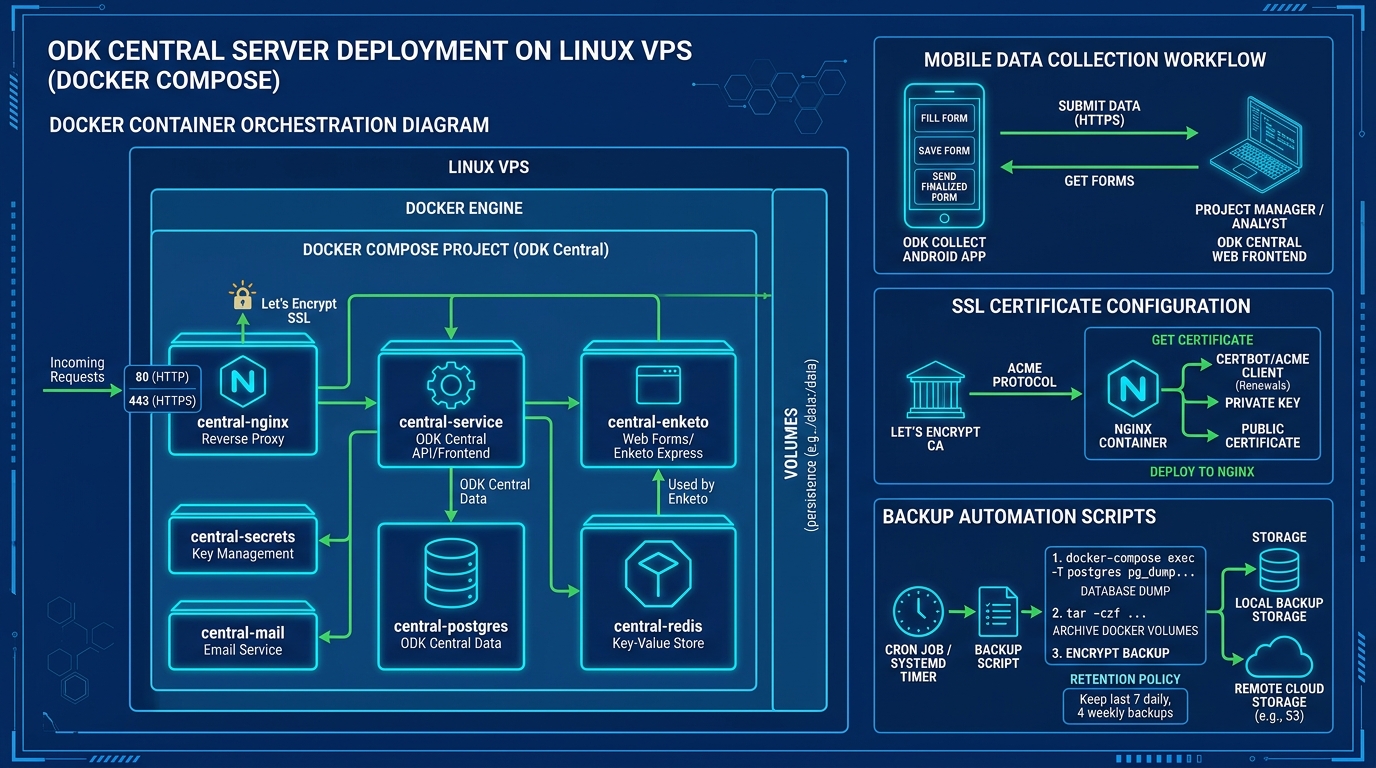
From nationwide public health surveillance programs (such as polio eradication and dengue monitoring) to socioeconomic research surveys and disaster response mapping, organizations across Pakistan rely on ODK (Open Data Kit) for offline mobile data collection. Field enumerators using Android devices submit geotagged data, photos, and complex survey responses from remote corners of Khyber Pakhtunkhwa, Balochistan, Sindh, and Punjab.
While legacy installations relied on ODK Aggregate, the modern, official backend is ODK Central. Built on a microservices architecture using Docker Compose, Node.js, Enketo web forms, Pyxform, and PostgreSQL, ODK Central provides role-based access control, cryptographic form encryption, and real-time OData feeds into PowerBI and Excel.
However, deploying ODK Central in production requires careful planning: provisioning persistent Docker volumes, configuring automated Let’s Encrypt SSL, setting up transactional email via SMTP, and tuning the internal PostgreSQL container to survive massive concurrent survey synchronizations.
In this practical handbook, we walk through deploying a hardened ODK Central server on an Ubuntu Linux Cloud VPS or enterprise Dedicated Servers.
1. ODK Central Containerized Architecture
ODK Central orchestrates multiple interconnected Docker containers behind an internal Nginx reverse proxy:
+--------------------------------------------------------------------------+
|                     ODK CENTRAL DOCKER MICROSERVICES                     |
+--------------------------------------------------------------------------+
| Mobile Enumerators (ODK Collect Android) & Web Users (Enketo Web Forms)  |
|        │                                                                 |
|        ▼ (HTTPS / Port 443)                                              |
| [ odk-nginx: Reverse Proxy & Automated Let's Encrypt SSL Manager ]       |
|        │                                                                 |
|        ├─────────────────────────────┬───────────────────────────────┤    |
|        ▼                             ▼                               ▼    |
| [ odk-service: Node.js API ]   [ odk-enketo: Web Forms ]   [ pyxform ]    |
| Core REST API & Auth Engine    Renders web browser surveys  Converts XLSForm
|        │                             │                                    |
|        └──────────────┬──────────────┘                                    |
|                       ▼                                                   |
| [ odk-postgres: Relational Database (100% Survey Submissions & Audit) ]  |
+--------------------------------------------------------------------------+
2. Server Preparation & Docker Engine Installation
Deploy a 64-bit Ubuntu 22.04 or 24.04 LTS instance with at least 4GB RAM and 2 vCPUs (for small to medium teams) or 8GB+ RAM for national surveys:
# Update repository index and install dependencies
sudo apt-get update && sudo apt-get install -y git curl ufw

# Install official Docker Engine and Docker Compose plugin
curl -fsSL https://get.docker.com -o get-docker.sh
sudo sh get-docker.sh

# Verify Docker installation
docker --version && docker compose version
Configure the host firewall to permit HTTP, HTTPS, and SSH:
sudo ufw allow 22/tcp
sudo ufw allow 80/tcp
sudo ufw allow 443/tcp
sudo ufw enable
3. Cloning ODK Central & Configuring Production Variables
Clone the official ODK Central repository along with its submodules:
git clone https://github.com/getodk/central.git /opt/odk-central
cd /opt/odk-central
git submodule update --init --recursive
Copy the environment template:
cp .env.template .envEdit .env with production configuration parameters:
# .env - ODK Central Production Configuration
# Fully Qualified Domain Name (Must have DNS A record pointed to this VPS!)
SSL_TYPE=letsencrypt
DOMAIN=surveys.yourngo.pk
SYSADMIN_EMAIL[email protected]

# =========================================================================
# SMTP TRANSACTIONAL MAIL CONFIGURATION (Required for account invites & alerts)
# =========================================================================
EMAIL_FROM_ADDRESS[email protected]
EMAIL_MESSAGE_ID_DOMAIN=surveys.yourngo.pk
EMAIL_HOST=mail.yourngo.pk
EMAIL_PORT=587
EMAIL_SECURE=false
EMAIL_IGNORE_TLS=false
EMAIL_USER[email protected]
EMAIL_PASSWORD=SuperSecureMailPassword123!
4. PostgreSQL Performance Tuning for Heavy Field Syncs
During evening survey synchronization windows when hundreds of field officers return to cellular coverage, thousands of multi-page survey submissions flood the server simultaneously. The stock PostgreSQL container configuration can bottleneck and run out of connection slots.
Create a custom PostgreSQL configuration drop-in in /opt/odk-central/files/postgres/custom_pg.conf:
# /opt/odk-central/files/postgres/custom_pg.conf
# Tuned for 4GB-8GB RAM Host
max_connections = 200
shared_buffers = 1GB
effective_cache_size = 3GB
work_mem = 16MB
maintenance_work_mem = 256MB
checkpoint_completion_target = 0.9
wal_buffers = 16MB
random_page_cost = 1.1
effective_io_concurrency = 200
Mount this file into the postgres service inside docker-compose.yml under volumes:
- ./files/postgres/custom_pg.conf:/etc/postgresql/postgresql.conf:ro5. Bootstrapping ODK Central & Creating the First Administrator
Start the complete microservices cluster:
cd /opt/odk-central
docker compose build
docker compose up -d
Verify that all five containers are running smoothly:
docker compose psExpected output:
NAME                     IMAGE                      STATUS
central-mail-1           central-mail               Up
central-nginx-1          central-nginx              Up (healthy)
central-postgres14-1     postgres:14                Up
central-service-1        central-service            Up
central-enketo-1         central-enketo             Up
Create the Initial Administrator Account
Use the built-in management script to create your administrative login:
docker compose exec service odk-cmd --email [email protected] user-createEnter a secure password when prompted.
6. Real-Time Operations: Backups & SSL Verification
Log into https://surveys.yourngo.pk in your browser. Verify the green padlock confirms Let’s Encrypt automated TLS issuance.
Automated Nightly Database Backups
Field research data is invaluable. Automate encrypted database backups to an offsite location using a daily cron job:
# /etc/cron.daily/backup-odk
#!/bin/bash
BACKUP_DIR="/backup/odk"
mkdir -p "$BACKUP_DIR"
DATE=$(date +%Y%m%d_%H%M%S)

# Dump PostgreSQL database directly from running container
docker compose -f /opt/odk-central/docker-compose.yml exec -T postgres14 \
    pg_dump -U odk odk | gzip > "$BACKUP_DIR/odk_backup_$DATE.sql.gz"

# Retain last 30 days
find "$BACKUP_DIR" -type f -mtime +30 -delete
Make it executable:
sudo chmod +x /etc/cron.daily/backup-odk7. Scaling to National Public Health Deployments
When running multi-provincial health monitoring programs handling tens of thousands of field staff, moving from a virtual instance to dedicated hardware eliminates hypervisor contention and guarantees rapid database indexing.
Explore our related infrastructure tutorials:
- MariaDB Galera Cluster Multi-Master Replication
- PostgreSQL Production Tuning: shared_buffers & work_mem
- Nginx Reverse Proxy Caching & Microcaching
For large-scale research initiatives, humanitarian data repositories, and national data collection programs requiring strict local data residency compliance, deploy on Dedicated Servers in Pakistan.
Deploy Self-Hosted Survey Platforms with Nextgen
Power your research and public health surveillance projects with high-IOPS NVMe cloud servers, automated backups, and 100% data sovereignty in Pakistan.
