
Choosing the wrong web hosting type is one of the costliest mistakes a business can make.
Pick an underpowered shared hosting plan for an e-commerce store, and your checkout page will crash during seasonal flash sales. Overpay for a complex bare-metal cluster for a simple brochure site, and you burn thousands of dollars on idle CPU cycles you will never use.
Web hosting in 2026 is no longer just “disk space and bandwidth.” It represents the underlying computing architecture, hypervisor layer, network routing, and security isolation that powers your online presence.
Whether you are launching your first WordPress blog, scaling a SaaS application, or running enterprise financial software, here is your definitive, technical guide to understanding every major type of web hosting.
Executive Summary: Types of Web Hosting
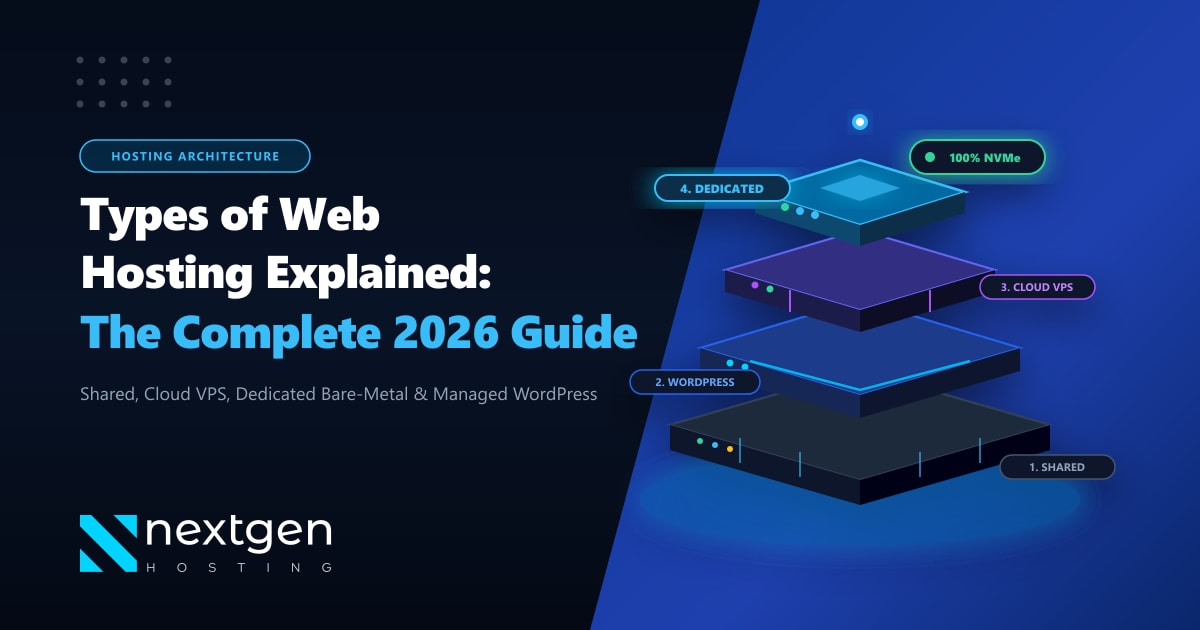
- Shared Hosting: The apartment building model. Hundreds of websites share the same server resources (CPU, RAM, IP). Cost-effective for low-traffic blogs and personal portfolios, but prone to noisy-neighbor slowdowns.
- Managed WordPress Hosting: Engineered specifically for WordPress speed and security. Pre-configured with LiteSpeed Enterprise, built-in object caching (Redis), automatic core updates, and server-side WAF rules.
- Cloud VPS Hosting: The condominium model. Uses KVM virtualization to guarantee dedicated CPU cores, RAM, and PCIe NVMe storage with full root access and isolated operating environments.
- Dedicated Bare-Metal Servers: The standalone private estate. 100% of the physical hardware—CPUs, memory channels, disks, and network interfaces—is dedicated exclusively to your workloads with zero virtualization overhead.
- Cloud Cluster Hosting: Multi-server architecture that distributes your site across redundant virtual nodes, automatically scaling during sudden traffic surges.
1. Shared Web Hosting: The Entry-Level Standard
Shared hosting is the most common entry point for newcomers. In a shared hosting environment, multiple websites (often hundreds or thousands) reside on a single physical server, sharing its central processing unit (CPU), random-access memory (RAM), and network interface card (NIC).
+-------------------------------------------------------------+
|                PHYSICAL SERVER HARDWARE                     |
|  [ CPU: 64 Cores ] [ RAM: 256GB ] [ Storage: NVMe RAID 10 ]  |
+-------------------------------------------------------------+
|                     OPERATING SYSTEM                        |
|       CloudLinux OS with Lightweight Virtual Environment    |
+-------------------------------------------------------------+
| Account 1   | Account 2   | Account 3   | ... | Account 500 |
| (Your Site) | (Client B)  | (Client C)  |     | (Client Z)  |
+-------------------------------------------------------------+
How It Works Under the Hood
Modern shared hosts utilize CloudLinux OS with LVE (Lightweight Virtual Environment) technology. LVE prevents any single account from consuming all server resources by enforcing hard quotas per cPanel account:
- CPU Limit: Typically 1 to 2 vCPU cores (100%–200% LVE).
- Memory Limit: Typically 1GB to 2GB physical RAM.
- I/O Bandwidth: Throttled to 10MB/s – 20MB/s to prevent disk bottlenecks.
- Entry Processes (EP): Maximum 20–30 simultaneous PHP/CGI connections.
Pros:
- Extremely Affordable: Costs as little as a few dollars per month.
- Turnkey Management: Server administration, security patches, PHP upgrades, and cPanel licenses are handled entirely by the host.
- One-Click Installers: Instant provisioning of WordPress, Joomla, and Laravel via Softaculous.
Cons:
- Strict Resource Throttling: Hitting your LVE limits results in
503 Service Unavailableor508 Resource Limit Reachederrors. - No Root Access: You cannot install custom system-level packages, background daemons, or custom Python/Node runtime versions.
- Shared IP Reputation: If a neighboring account on your shared server sends unsolicited spam, your domain’s transactional emails may land in spam folders.
Best For: Hobbyists, personal portfolios, small local service businesses, and websites receiving under 15,000 visitors per month.
2. Managed WordPress Hosting: Tuned for Speed & Security
While WordPress can run on any standard PHP/MySQL server, Managed WordPress Hosting is fine-tuned specifically to eliminate WordPress-specific bottlenecks.
Architectural Advantages
Unlike generic shared hosting running legacy Apache, managed WordPress hosting utilizes LiteSpeed Web Server (LSWS) paired with the LiteSpeed Cache (LSCache) plugin.
Incoming Request -> Cloudflare CDN -> LiteSpeed Web Server (LSWS)
                                          |
                      +-------------------+-------------------+
                      |                                       |
             [ Cache Hit (Static) ]                  [ Cache Miss (Dynamic) ]
                      |                                       |
             Returns HTML in <20ms                  Executes PHP 8.3 & OPcache
                                                              |
                                                    Redis In-Memory Object Cache
                                                              |
MariaDB NVMe Database- Server-Level Caching: Bypasses PHP execution entirely for cached pages, serving static HTML directly from server RAM in under 20 milliseconds.
- Object Caching via Redis: High-frequency database queries (
wp_options, WooCommerce product metadata) are cached in memory rather than reading from disk. - WordPress-Specific Web Application Firewall (WAF): Real-time virtual patching against known CVE exploits in popular plugins (Elementor, WooCommerce, Contact Form 7).
- Automated Staging & Backups: One-click sandbox environments to test theme or plugin updates before pushing them to production.
Best For: E-commerce stores, content creators, affiliate marketers, and business websites running exclusively on WordPress that prioritize sub-second page loads.
3. Cloud VPS (Virtual Private Server) Hosting: Guaranteed Isolation
When your website outgrows shared hosting limits, a Virtual Private Server (VPS) is the natural progression.
A physical host server is partitioned into multiple completely isolated virtual machines using KVM (Kernel-based Virtual Machine) hypervisor virtualization.
+-------------------------------------------------------------+
|                PHYSICAL HARDWARE NODE                       |
+-------------------------------------------------------------+
|                    KVM HYPERVISOR                           |
+------------------------------+------------------------------+
|            VPS A             |            VPS B             |
| - Dedicated 4 vCPU Cores     | - Dedicated 8 vCPU Cores     |
| - Guaranteed 8GB RAM         | - Guaranteed 16GB RAM        |
| - 160GB NVMe Storage         | - 320GB NVMe Storage         |
| - Dedicated IPv4 & IPv6      | - Dedicated IPv4 & IPv6      |
| - Custom OS (Ubuntu 24.04)   | - Custom OS (AlmaLinux 9)    |
| - Full Root (SSH) Access     | - Full Root (SSH) Access     |
+------------------------------+------------------------------+
Key Technical Differentiators
- Dedicated Resource Guarantees: Unlike shared hosting where memory is pooled, your VPS RAM and CPU threads are physically allocated to your virtual machine. Neighboring tenants cannot degrade your server performance.
- Full Root (SSH) Access: You possess administrative sovereignty. You can compile custom Nginx modules, install Docker containers, run Node.js/Python daemons, and configure custom system firewalls (UFW/CSF).
- Dedicated IP Address: Your domain has its own clean, unshared IP address, safeguarding email deliverability and SSL security.
Self-Managed vs. Managed VPS
- Self-Managed (Unmanaged): You receive a bare operating system installation. You are responsible for configuring web servers, securing SSH, installing firewalls, and managing updates. Ideal for developers.
- Managed VPS: The hosting provider provides a control panel (cPanel, DirectAdmin, or Plesk) and handles server hardening, kernel patches, and 24/7 technical monitoring.
Best For: Growing e-commerce brands (50,000+ monthly visits), SaaS startups, custom web applications, digital marketing agencies hosting multiple client sites, and developers needing Docker environments.
4. Dedicated Bare-Metal Server Hosting: Pure Computing Power
A Dedicated Server represents the zenith of web hosting infrastructure. There are no hypervisors, no virtualization layers, and no other users. You rent the entire physical computer inside an enterprise data center.
Bare-Metal Architecture
With a dedicated server, your applications interface directly with the physical motherboard, PCIe lanes, and hardware controllers:
- Processors: Multi-core server processors (AMD EPYC 9004 series or Intel Xeon Scalable) with 32 to 128 physical cores.
- Memory Subsystem: Multi-channel ECC (Error-Correcting Code) DDR5 RAM up to 512GB or 1TB, eliminating bit-flip errors during high-frequency calculations.
- Storage Arrays: Hardware RAID controllers with enterprise enterprise-grade PCIe Gen4/Gen5 NVMe SSDs delivering millions of IOPS.
- Network Uplinks: Unmetered 1Gbps, 10Gbps, or 40Gbps symmetrical network ports.
Global vs. Local Dedicated Infrastructure
Where your dedicated hardware is geographically provisioned directly impacts network latency:
- For global software exports, SaaS platforms, and distributed systems, deploying on enterprise Dedicated Servers in international tier-3 data centers guarantees high-bandwidth international connectivity and multi-homed BGP transit.
- For domestic enterprises, financial institutions, national logistics providers, and high-traffic Pakistani websites, deploying on Dedicated Servers in Pakistan ensures sub-10ms domestic latency across PTCL, Nayatel, StormFiber, and Jazz telecom backbones, full compliance with local data residency mandates, and local PKR billing.
Virtual VPS Stack:       Bare-Metal Dedicated Stack:
+-------------------+    +-------------------+
|  Web Application  |    |  Web Application  |
+-------------------+    +-------------------+
|  Guest OS Kernel  |    |     OS Kernel     |
+-------------------+    +-------------------+
|  KVM Hypervisor   |    | Physical Hardware |
+-------------------+    | (Zero Hypervisor) |
|  Host OS Kernel   |    +-------------------+
+-------------------+
| Physical Hardware |
+-------------------+
Best For: High-volume e-commerce platforms (millions in monthly revenue), banking and fintech portals, big data analytics, gaming servers, high-density Docker/Kubernetes container clusters, and large digital agencies.
5. Cloud Hosting: Distributed Scalability & High Availability
Traditional hosting pins your website to a single machine. If that machine’s power supply fails, your site goes down.
Cloud Hosting operates on a distributed cluster of networked servers. Your application files, databases, and assets are hosted across a virtualized cluster powered by Ceph or distributed storage backplanes.
Core Cloud Capabilities
- Auto-Scaling: Server CPU and RAM automatically scale up or horizontally add nodes during unexpected traffic surges (e.g., Black Friday sales or viral news coverage).
- Self-Healing Failover: If a physical hardware node in the cloud cluster fails, virtual instances automatically migrate to a healthy node in seconds without service interruption.
- Utility Billing: Many cloud platforms offer pay-as-you-go billing, charging only for the exact compute seconds, RAM, and gigabytes consumed.
Best For: Fast-growing startups, mission-critical business applications, and websites with volatile, unpredictable traffic spikes.
6. Reseller Hosting: Launching Your Own Hosting Business
Reseller Hosting is a specialized form of shared hosting that allows entrepreneurs, agencies, and web developers to act as independent hosting providers.
Using WHM (WebHost Manager), you can carve out custom hosting packages (e.g., 5GB disk space, 50GB bandwidth) and resell them to your clients under your own brand name:
- White-Label Branding: Custom nameservers (
ns1.youragency.com) and custom logos in client cPanel dashboards. - Automated Billing: Integration with WHMCS or ClientExec to handle customer invoices, recurring credit card payments, and automated service provisioning.
- Isolated Client Accounts: Each client receives their own separate cPanel login, preventing one client from accessing another client’s files.
Best For: Web design and development agencies wanting to generate recurring monthly retainer revenue from client hosting.
7. Colocation Hosting: Owning the Metal
In Colocation Hosting, you do not rent hardware from a host. Instead, you purchase your own 1U or 2U rack-mountable server hardware and rent rack space, electricity, cooling, and internet bandwidth inside a commercial data center.
Why Choose Colocation?
- Full Hardware Ownership: You select the exact motherboard, specialized GPU accelerators (Nvidia H100s for AI training), and storage drives.
- Capital Expenditure (CapEx) Efficiency: At massive scale (hundreds of servers), owning hardware and paying only for power and rack space is often cheaper than renting servers long-term.
- Ultimate Privacy & Compliance: Physical server access is locked behind biometric data center security and strictly restricted to your authorized engineering staff.
Best For: Telecoms, government agencies, large financial corporations, and AI research labs with in-house hardware engineering teams.
8. Web Hosting Types Comparison Matrix
| Hosting Type | Monthly Cost Range | Performance & IOPS | Technical Skill Required | Server Isolation | Best For |
|---|---|---|---|---|---|
| Shared Hosting | $2 – $10 | Low (Throttled) | Beginner | Low (Shared OS) | Personal blogs, local service sites |
| Managed WordPress | $8 – $35 | High (Cache-Tuned) | Beginner – Intermediate | Medium | WordPress & WooCommerce sites |
| Cloud VPS | $12 – $90 | High (Dedicated Cores) | Intermediate – Advanced | High (KVM Virtualized) | Growing apps, SaaS, e-commerce |
| Dedicated Server | $90 – $600+ | Maximum (Bare-Metal) | Advanced / SysAdmin | 100% (Physical Node) | High-traffic platforms, enterprise |
| Cloud Hosting | $20 – $300+ | Elastic / Scalable | Intermediate – Advanced | High | Spiky traffic, high availability |
| Reseller Hosting | $15 – $75 | Moderate | Intermediate | Medium (Per cPanel) | Web agencies & hosting startups |
| Colocation | $100 – $1,000+ | Custom Hardware | Expert | 100% (Owned Hardware) | Telecoms, data centers, AI clusters |
9. How Web Hosting Types Directly Affect Your SEO & Search Rankings
Many website owners mistakenly view web hosting solely as a technical line-item expense. In reality, your hosting infrastructure directly dictates your organic search visibility on Google.
Google’s search algorithm heavily penalizes slow, unreliable websites through its Core Web Vitals performance thresholds:
- Time to First Byte (TTFB): The time it takes for a server to process a request and send the first byte of HTML back to the browser. While Google recommends a TTFB under 200ms, cheap shared hosting servers with hundreds of active accounts regularly clock TTFB spikes of 1,200ms to 2,500ms.
- Interaction to Next Paint (INP) & Largest Contentful Paint (LCP): Underpowered servers that struggle to execute database queries slow down resource delivery, causing high LCP scores and poor mobile rankings.
- Crawl Budget Wastage: If Googlebot encounters slow response times or
500/503server errors, it immediately curtails its crawl frequency. New product pages and updated blog posts take weeks to get indexed instead of hours. - IP Reputation & Bad Neighbors: On overcrowded shared hosts, sharing an IP subnet with illicit spam sites or malware distributors can trigger automated security warnings in search engine algorithms.
As detailed in this in-depth guide on how web hosting affects SEO, search engines like Google actively reward websites hosted on modern, fast-loading server stacks with higher organic visibility and lower bounce rates.
Upgrading from shared hosting to an isolated Cloud VPS or dedicated server is often the single most cost-effective technical SEO optimization a business can implement.
10. How to Choose the Right Web Hosting Type for Your Needs
Before purchasing a hosting plan, evaluate your project across these four objective criteria:
                          [ START ]
                              |
               What is your primary platform?
                              |
         +--------------------+--------------------+
         |                                         |
   [ WordPress / WooCommerce ]               [ Custom Code / Other ]
         |                                         |
Expected monthly traffic?                Do you need root/terminal access?
         |                                         |
   +-----+-----+                             +-----+-----+
   |           |                             |           |
<25k        >25k                            Yes          No
   |           |                             |           |
[Managed    [Cloud VPS or               [Cloud VPS or   [Shared
WordPress] Dedicated] Dedicated] Hosting]- Traffic Scale: If your site receives fewer than 15,000 monthly visits, a solid shared or managed WordPress plan is plenty. Above 50,000 visits, move to a Cloud VPS. Above 250,000 visits or heavy dynamic database queries, deploy a dedicated server.
- Dynamic vs. Static Content: A blog with static text can handle high traffic on modest hosting thanks to edge caching. However, dynamic platforms (WooCommerce checkouts, user dashboards, real-time search queries) require raw CPU horsepower and dedicated memory.
- Technical Expertise: If you do not have a dedicated Linux systems administrator, choose managed hosting solutions where server updates, firewall configurations, and PHP patches are fully automated.
- Data Privacy & Geography: If you operate in Pakistan and handle domestic citizen data, e-banking transactions, or government portals, choose hosting with dedicated domestic routing to satisfy regulatory compliance.
Find the Perfect Web Hosting Infrastructure Today
From lightning-fast managed WordPress hosting to high-performance Cloud VPS and enterprise Dedicated Servers in Pakistan, Nextgen Hosting delivers pure NVMe storage, 99.9% uptime SLAs, and 24/7 technical support.
